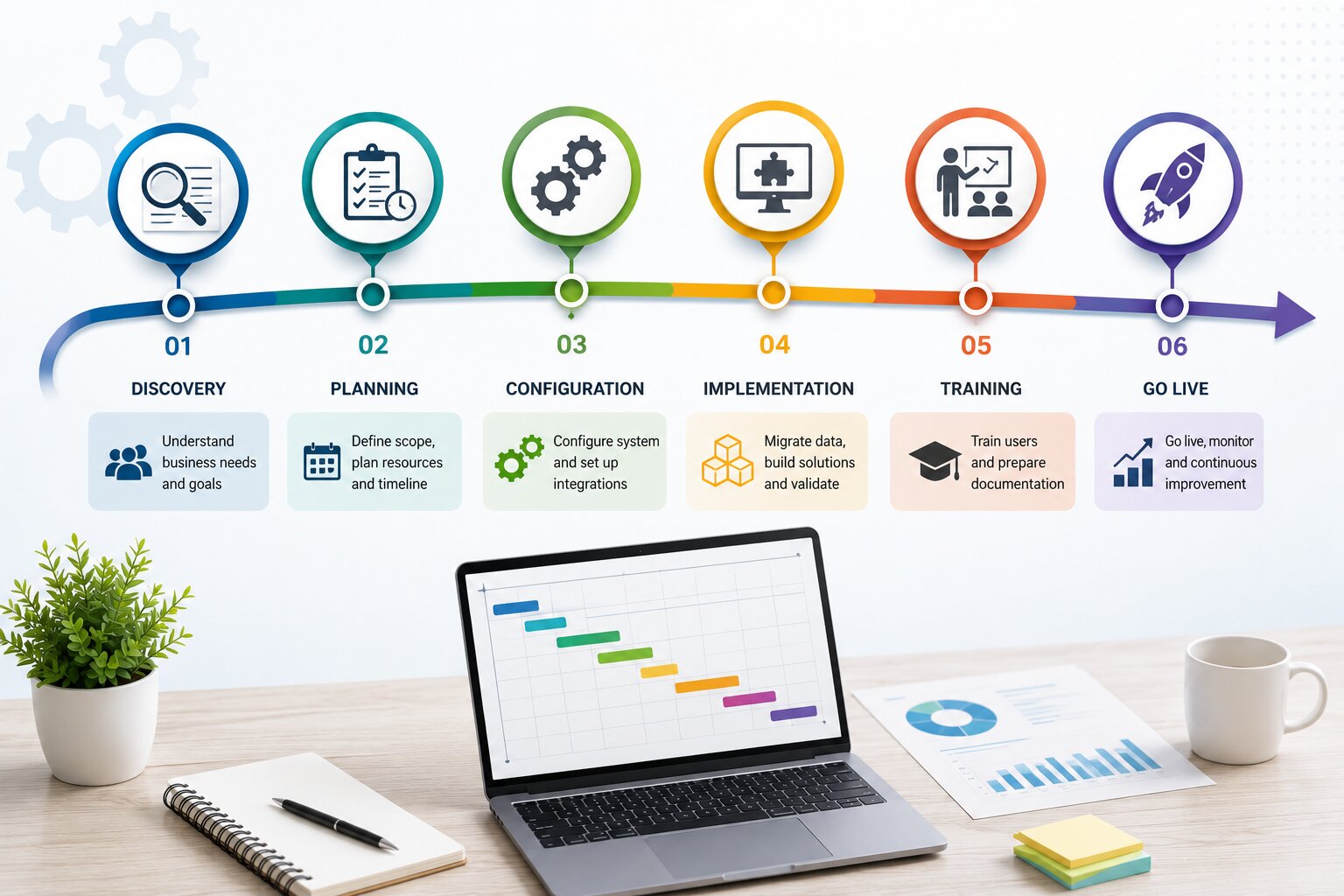
How long will this take? It’s usually the first question business leaders ask once they’ve decided Dynamics 365 Business Central is the right fit for their organization—and for good reason. An ERP rollout touches nearly every department, so the Dynamics 365 Business Central implementation timeline shapes everything from budgeting and staffing to when your team can finally leave spreadsheets behind for good.
The honest answer isn’t a single number. It’s a range that depends on factors like the complexity of your business, the quality of your existing data, and—perhaps most importantly—who’s leading the project. This guide walks you through what influences the Dynamics 365 Business Central implementation timeline, what to expect during each phase, and how the right implementation partner can keep your rollout on schedule.
What Actually Drives the Timeline?
Every dynamics 365 deployment moves at its own pace, but the same handful of variables tend to determine whether a project wraps up in two months or drags into its seventh:
- Organizational complexity — A single-location business with straightforward finance and inventory needs will implement far faster than a multi-entity company juggling intercompany transactions and multiple currencies.
- Scope of modules — Rolling out finance alone is quick. Adding manufacturing, warehousing, service management, and project accounting on top stretches the timeline considerably.
- State of your data — Clean, well-organized legacy data migrates smoothly. Data scattered across spreadsheets, old systems, and manual records almost always adds weeks to the project.
- Level of customization — Standard, out-of-the-box configuration moves quickly. Custom AL extensions, bespoke workflows, or niche industry requirements take more development and testing time.
- Team readiness — Training and internal change management matter as much as the technical build. Departments that adapt quickly keep the project moving; those that resist slow it down.
- Partner experience — An experienced dynamics 365 business central integration partner has already solved most of the problems your team is about to encounter for the first time, which cuts out a lot of trial and error.
Realistic Timelines by Business Size
There’s no universal number, but these ranges give a solid starting point for planning purposes.
Small Businesses
Timeline: roughly 6 to 10 weeks
Companies with core finance, sales, and inventory needs, minimal customization, and reasonably clean data can typically be live within two to three months.
Mid-Sized Businesses
Timeline: roughly 3 to 6 months
Organizations juggling multiple departments, several system integrations, moderate customization, and more sophisticated reporting needs generally land in this middle range.
Enterprise or Multi-Entity Organizations
Timeline: 6 to 12+ months
Businesses with multiple subsidiaries, heavy customization, complex legacy migrations, or operations spanning several countries usually need a phased approach to protect stability across every business unit.
Breaking Down the Implementation Phases
Knowing where the time actually goes makes the whole process far less of a black box.
1. Discovery and Planning
Requirements are gathered, current processes are mapped, and the roadmap for the entire project gets built here. Teams that rush this stage almost always pay for it later with rework.
2. System Design and Configuration
This is where Dynamics 365 Business Central gets shaped around your business — chart of accounts, approval hierarchies, inventory structures, and user roles are all configured to match how you actually work.
3. Data Migration
Legacy data is cleaned, mapped, and moved into the new system. This is frequently the phase that runs longest, especially when historical records are inconsistent or duplicated.
4. Integration and Customization
Third-party tools, e-commerce platforms, CRM systems, and any custom extensions get built and connected during this stage.
5. Testing
User acceptance testing confirms that workflows behave as expected before anyone goes live. Skipping or rushing this step is one of the most common reasons implementations run into trouble after launch.
6. Training and Go-Live
End users get trained, and the system officially goes live — usually with a hypercare period afterward where the implementation partner stays close by to catch and resolve any issues quickly.
How to Keep the Timeline Tight — Without Cutting Corners
- Clean and organize your data before migration even begins
- Lock down requirements early so scope doesn’t creep mid-project
- Consider a phased rollout if your organization spans multiple departments or entities
- Bring stakeholders from every affected department into planning early, not just IT
- Partner with one of the top microsoft dynamics partners india has to offer rather than a generalist implementer
That last point tends to matter more than businesses expect going in. A big part of implementation speed comes down to the expertise steering the project, not just the software itself.
Why the Implementation Partner Makes or Breaks the Timeline
Rushing a project with an inexperienced team rarely saves time — it usually costs more of it. Mistakes made early, like poor data mapping or missed requirements, tend to resurface later as expensive rework that pushes the go-live date back even further.
An experienced dynamics 365 business central integration partner helps avoid that trap by bringing:
- Implementation frameworks refined across dozens of prior projects
- Industry-specific templates that cut configuration time significantly
- Timeline estimates grounded in real project data rather than optimistic guesswork
- Post-launch support that stabilizes operations quickly after go-live
At Preeminent Softcom, we’ve guided organizations across manufacturing, retail, healthcare, and beyond through Dynamics 365 Business Central implementations that stay on schedule and on budget without sacrificing long-term scalability.
FAQ
Q: What’s the fastest a Business Central implementation can realistically be completed?
A: Very small businesses with clean data and little to no customization have sometimes gone live in as little as 4 to 6 weeks, though this is on the aggressive end.
Q: Does the implementation timeline include employee training?
A: Yes. Training is typically built into the go-live phase, and additional support often continues for a few weeks afterward as teams settle in.
Q: Can a phased rollout shorten the overall timeline?
A: It can shorten time-to-value — core modules go live sooner, with additional functionality layered in later, even if the full project timeline stays similar.
Q: What should I look for when choosing an implementation partner?
A: Proven Dynamics 365 Business Central experience, relevant industry case studies, transparent and realistic timelines, and solid post-launch support.
Ready to Plan Your Business Central Implementation?
No two timelines look exactly alike, but one thing holds true across every project: the right partner is what separates a smooth rollout from a stalled one.
Preeminent Softcom helps businesses implement Dynamics 365 Business Central efficiently, with realistic planning, clean data migration, and dedicated support at every stage of the journey.
Get in touch with Preeminent Softcom today for a free implementation assessment, or explore ourDynamics 365 Business Central services to see exactly how long your journey could take.